How to Access and Take Courses
To create your account and start learning, follow these steps:
Step 1: Go to the Online Training Hub
Visit EVA BC’s Online Training Hub to access the training site.
Step 2: Create an account or log in
- If you’re a new user, click on “Sign up” and fill in the details to create an account.
- If you already have an account, simply log in with your username and password by clicking “Sign in.”
When creating your account, please make sure to select your role in your organization so you are assigned access to your program-specific Core course
Step 3: Browse available courses
Once logged in, go to the “Course Catalogue” to view all available trainings. You can also use the search bar to find a specific course.
Step 4: Enroll in a course
- Click on the course you want to take.
- Click “Enroll” to register.
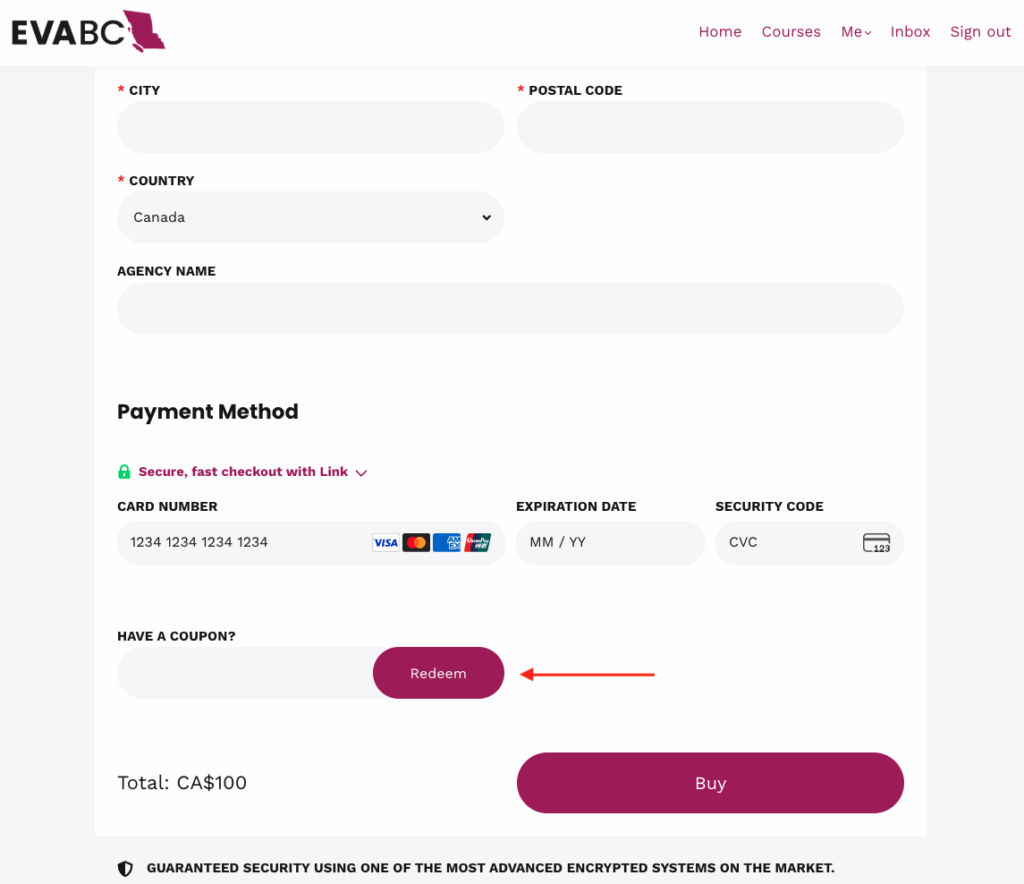
- Once you select ‘Enroll’, either continue with the payment method or enter the member Coupon Code sent to you to access all Foundation and Specialized courses.
- If you are not automatically enrolled in a program-specfiic Core training, please reach out to us at training@. Please note that these Core trainings are only available to members in the corresponding contracted program.
Please note that if you are a member, you do not have to input ANY payment information. When you add and redeem the code, the cost of the course will become $0 and you will be able to enroll for free without adding your credit card information.
Step 5: Start your training
Once enrolled, you’ll be able to access all modules, videos, and resources. Click “Start Course” to begin and work through at your own pace.
Step 6: Download your certificate
After completing the course, you’ll be able to download a certificate of completion from your dashboard.